
Planning a European corporate retreat means juggling dozens of calendars and crossing your fingers for a smooth scheduling process. The reality is, missed invites, slow responses, and conflicting priorities often derail even the best intentions. Coordinators know that small mistakes can lead to last minute stress or poor attendance when teams across London, Berlin, and Milan do not have clear dates and details from the start.
Fortunately, the right scheduling strategies can turn chaos into clarity. By using proven concepts like identifying key dates early, asking participants to mark their busy days, and sending automated reminders through familiar platforms, you keep everyone informed and ready to engage.
Get ready to discover smart, actionable steps that European retreat organizers use to save time, increase attendance, and make planning effortless. Each insight in this list tackles a common problem and gives you a reliable solution you can put into practice right away.
Table of Contents
- Identify Key Dates Before Sending Invites
- Use Inverse Scheduling to Pinpoint Availability
- Create Event Polls With Simple, Shareable Links
- Visualize Busy Days to Shortlist Options Fast
- Set Automated Reminders to Speed Up Replies
- Centralize Communication for Real-Time Updates
- Export Data for Quick Scheduling Decisions
Quick Summary
| Key Message | Explanation |
|---|---|
| 1. Confirm Key Dates Before Inviting | Locking in retreat dates prevents scheduling conflicts and improves attendance. Communicate these clearly to participants in advance. |
| 2. Utilize Inverse Scheduling | Asking participants when they are unavailable simplifies responses and accelerates date selection, boosting participation rates and reducing planning time. |
| 3. Create Shareable Event Polls | Using a single link for availability collection streamlines responses and increases participation, reducing barriers to input across various platforms. |
| 4. Visualize Availability Data | Utilizing visual representations of participant availability helps quickly identify optimal retreat dates and reduces analysis time significantly. |
| 5. Centralize Communication | Designating one primary platform for all planning information ensures team members have consistent access to updates and reduces confusion. |
1. Identify Key Dates Before Sending Invites
Your calendar is the foundation of every successful retreat. Before you send a single invitation, you need to lock in your key dates and communicate them clearly to participants. This sounds obvious, but many coordinators skip this step and pay the price later when conflicts arise and attendance drops.
Why does timing matter so much? Determining retreat dates early ensures you align with institutional priorities, avoid scheduling conflicts, and give participants enough notice to plan their personal commitments. When you identify dates upfront, you're not just picking random days on a calendar. You're creating a structure that everyone understands and can work around.
Start by considering what time frames actually work for your group. If you're organizing a corporate retreat in Europe, you need to account for multiple factors. Consider school holidays, major industry events, and seasonal considerations that might affect attendance. If you're targeting German and Italian teams, bank holidays differ significantly. A date that works perfectly for Frankfurt might conflict with a key holiday in Milan.
Next, establish clear milestone dates within your retreat timeline. Document when registration closes, when you need final headcount confirmations, and when participants receive detailed itineraries. These internal deadlines keep your planning on track and signal to attendees how seriously you take organization. People respond better when they see a structured schedule with real deadlines.
Clear goals and key dates enhance attendance because participants can plan ahead with confidence. When invitations go out with specific dates already locked in, people can immediately check their calendars. No back and forth. No "we'll find a time that works for everyone" followed by weeks of scheduling chaos. Your team can commit or decline within minutes.
Once you've identified your core dates, confirm your venue can accommodate those dates before you send anything to participants. There's nothing worse than announcing a retreat date, then discovering the hotel is booked or the conference center isn't available. Verification takes 24 hours. Rescheduling after sending invites takes weeks.
Consider creating a simple timeline document that shows participants exactly what's happening and when. Include the full retreat duration, registration deadline, payment due date, and any pre retreat preparation tasks. Share this alongside your invitation. Transparency about dates builds confidence and reduces last minute questions.
Pro tip: Build a two week buffer between your invitation send date and your final registration deadline. This gives participants time to coordinate their schedules while still giving you enough lead time to finalize accommodations and logistics.
2. Use Inverse Scheduling to Pinpoint Availability
Traditional scheduling asks the wrong question. Most tools require participants to submit when they ARE available, forcing people to scan their calendars and type out multiple time slots. This creates friction and low response rates. Inverse scheduling flips the approach entirely by asking participants when they are NOT available instead.
This simple shift in perspective saves enormous amounts of time. Rather than asking your 30 retreat participants to list their free hours, you ask them to mark only their busy days or conflicts. Most people can answer that question in seconds. They know they have a client meeting on Tuesday, a family commitment on Friday, and a conference next week. Marking those few unavailable dates takes far less mental effort than constructing a complete availability calendar.
Why does this matter for your European corporate retreat planning? When you use inverse scheduling principles, you dramatically increase participation rates and reduce the back and forth communication that eats up your planning timeline. People respond faster when the request is simple. Faster responses mean you can identify optimal dates within days instead of weeks.
The mechanics are straightforward. You propose a potential date range for your retreat, then share that range with participants. They indicate only the days when they cannot attend. As responses come in, a clear picture emerges showing which dates have the fewest conflicts. You see immediately where the overlaps exist without needing to manually cross reference 30 different availability spreadsheets.
Consider the real world scenario. You're coordinating a three day retreat for teams across London, Berlin, and Barcelona. Using traditional scheduling, you send invites asking when people are available in the April to June window. Responses trickle in over two weeks. Some people list single days, others list ranges. You spend hours building a spreadsheet trying to find overlaps. Using inverse scheduling, you say "We're considering April 15-30 or May 5-20. Which dates don't work for you?" Participants respond in 48 hours. You immediately see that May 15-17 works for everyone except two people, while April 20-22 has five conflicts. The decision becomes obvious.
This approach also reduces decision fatigue for participants. They don't need to commit mentally to specific time slots or worry about being unavailable for the "perfect" window. They simply flag their constraints. The aggregate data does the heavy lifting. When people feel their input is easy to give and genuinely useful, they respond more promptly and completely.
Implement inverse scheduling by setting a reasonable date range based on venue availability, company calendar, and seasonal considerations. Make that range broad enough to accommodate most people but narrow enough to be manageable. Two to four weeks is typically ideal. Share your proposed window with a clear deadline for responses, usually 5 to 7 days. Track responses as they come in and highlight the dates with minimal conflicts.
The time savings compound. Faster availability collection means faster venue confirmation. Earlier venue confirmation means earlier detailed planning. Earlier planning means less stress and higher quality execution. What once took three weeks of scheduling coordination now takes three or four days.
Pro tip: Set your initial date range slightly wider than your actual needs. This gives you flexibility to accommodate unexpected conflicts while still landing on a date that works for the majority of your group.
3. Create Event Polls With Simple, Shareable Links
One link. That's all it takes to collect availability from your entire retreat group. Instead of managing email chains, spreadsheets, or complex signup forms, you share a single URL that everyone can access immediately without creating accounts or navigating confusing interfaces.
Simplicity drives participation. When you ask participants to click one link and answer a straightforward question about their availability, response rates jump dramatically. Compare this to asking someone to sign up for a scheduling platform, create a password, verify their email, and then fill out their availability. Most people abandon that process halfway through. A shareable link removes every barrier between the request and the action.
The mechanics work in your favor as an event coordinator. You create your poll specifying your proposed retreat dates or activity options. The system generates a unique, shareable link that you can send via email, messaging apps, or include in calendar invitations. Participants click the link, see the options clearly, make their selections, and submit their response. That's it. No accounts. No complications. No follow up emails asking people to complete their profiles.
Why is this approach particularly valuable for coordinating across multiple European markets? Your retreat might involve participants from France, Germany, Spain, and the United Kingdom. Some will respond to email immediately. Others prefer WhatsApp or Slack. A simple link works everywhere. You can share it in your team communication platform without worrying about compatibility issues or whether people have access to specific software. A URL works on any device, any browser, any region.
When you collect participant availability easily online, you also gain real time visibility into responses. As people submit their preferences, you see results updating instantly. You don't need to wait for everyone to respond before identifying patterns. Halfway through your collection window, you might already see that April 18-20 is clearly winning. This allows you to start related planning tasks earlier instead of waiting for complete data.
The link itself becomes your communication tool. Instead of sending separate emails about registration, availability, and next steps, everything flows through that single resource. When you need to update participants about changes or reminders, you can update the message on the page they see when they access your link. They receive consistent, current information every time they visit.
Practical implementation is straightforward. Determine your proposed dates or options. Set a deadline for responses. Create your poll with clear wording that prevents confusion. Generate your shareable link. Send it to all participants with a brief explanation of what you need and why. Include the deadline prominently. Track responses as they arrive. Follow up with non responders a few days before your deadline if needed.
One additional benefit that coordinators often overlook is that shared links create accountability. When participants receive a direct link from their manager or coordinator with their name attached to the response, they're more likely to complete it promptly. It feels more official and important than a generic survey request. People know their input directly affects retreat planning outcomes.
Consider the time difference between traditional coordination and link based scheduling. Traditional approach takes 2 to 3 weeks from sending invitations to confirming final dates. Link based approach takes 3 to 5 days. Over the course of planning multiple retreat components, that acceleration adds up to weeks of time saved.
Pro tip: Include a clear deadline in your link message and send a single reminder email 24 hours before that deadline highlighting how many people have responded and how much time remains.
4. Visualize Busy Days to Shortlist Options Fast
Raw data is useless if you cannot see patterns. When you collect availability information from dozens of participants, the real power comes from visualizing that data in a format that shows you conflicts at a glance. Instead of reviewing spreadsheets and manually marking overlaps, you need a visual representation that makes decisions obvious.
Imagine looking at a calendar where each participant's unavailable days appear as colored blocks across a date range. Dates with no blocks show clear availability. Dates with multiple blocks reveal conflicts. You can scan this visual in seconds and identify which dates work best for your group. This is the power of visualization in retreat planning.
Why does this matter for your coordination efforts? Traditional scheduling approaches require you to build mental models of 20 or 30 people's availability simultaneously. Your brain is not optimized for that task. Visual representation offloads that cognitive burden and lets you identify solutions instantly. You move from analysis paralysis to action in minutes.
When you visualize participant availability across proposed dates, you can see immediately where your optimal windows exist. A date that seemed perfect in your mind might have six conflicts. A date you barely considered might be completely clear. The visualization reveals truth that guesswork cannot.
Consider a practical scenario. You proposed four potential date ranges for your European corporate retreat. One option runs April 15-20. Another spans April 22-27. You have May 5-10 and May 12-17 as backup options. You receive availability from 35 participants indicating their busy days. Without visualization, you face hours of manual analysis. With visualization, you see immediately that May 12-17 has only three conflicts while April 15-20 has twelve. The decision becomes clear before you finish your morning coffee.
Visualization also reveals secondary insights that raw numbers miss. You might notice that conflicts cluster on specific days. Maybe Fridays show more unavailability because people take extended weekends. Mondays after bank holidays create bottlenecks. These patterns inform not just your date selection but your retreat structure. Understanding when your group is most available helps you schedule high energy activities and critical sessions during peak availability windows.
The mechanics of visualization vary depending on your tools, but the principle remains constant. You need a calendar or timeline view that shows you simultaneously which dates have conflicts and which dates are clear. Color coding helps. Numbers matter. Percentages of available participants matter. The goal is immediate comprehension without mental calculation.
Implement visualization by using tools that automatically generate visual calendars from your collected availability data. As responses come in, the visualization updates in real time. You see your options becoming clearer as more people submit their preferences. This real time feedback lets you adjust your proposed date range if needed before your collection deadline passes.
Visualization also serves a communication purpose. When you present your shortlisted date options to stakeholders or leadership, showing them the visual representation of conflicts is far more persuasive than saying "May 15 had fewer conflicts." They can see the evidence themselves. The visual becomes your proof that your chosen date is optimal.
One additional benefit emerges when you need to make difficult tradeoffs. Perhaps your top choice date has conflicts for three key executives. Your second choice date is completely clear but falls during a competing company event. Visual comparison lets you weigh these factors strategically. You can see exactly what you gain and lose with each choice.
Pro tip: When visualizing availability, highlight the top three to five candidate dates clearly and present only those options to decision makers rather than showing the entire range with all potential dates.
5. Set Automated Reminders to Speed Up Replies
People forget. Even when they intend to respond to your availability request, life gets in the way. A meeting runs long. An urgent email arrives. The notification gets buried under dozens of others. Automated reminders solve this universal problem by keeping your retreat planning top of mind at exactly the right moment.
Automated reminders work because they interrupt the natural forgetting curve. Without reminders, most people respond to requests within the first 24 hours. Response rates drop sharply after that. A well timed reminder can recapture people who intended to respond but simply forgot. For retreat planning with tight deadlines, this difference between 60 percent response rate and 90 percent response rate means the difference between making decisions quickly or waiting another week for stragglers.
The mechanics are simple. You set up a reminder system that sends notifications to participants at specific intervals. The first reminder goes out when you initially share your availability request. A second reminder arrives 3 to 5 days later to those who have not yet responded. A final reminder goes out 24 hours before your deadline. Each reminder is just enough nudge to prompt action without feeling aggressive or annoying.
Automated reminder systems integrated with communication platforms like email, Slack, and Microsoft Teams allow you to reach people through channels they already monitor. Someone might miss an email notification but will definitely see a Slack message during their workday. Giving participants multiple notification channels increases the probability that your message gets through and gets acted upon promptly.
For European retreat coordinators, automation is particularly valuable when managing across time zones and work cultures. A German team might respond best to structured email reminders. An Italian team might prefer personal messages. British colleagues might check Slack throughout the day. Automated systems can send the same core message through multiple channels simultaneously, meeting people where they actually are rather than forcing them into a single communication method.
Implementation requires minimal effort on your part. Most scheduling and communication platforms have built in reminder functionality. You configure when reminders should be sent and what message should appear. The system handles the rest automatically. You do not need to manually send follow up emails or spend time tracking who has responded and who has not. The automation does that work for you.
Consider the time savings across a typical retreat planning cycle. Without automation, you manually send the initial request. After 3 days, you realize only half your team has responded. You send a follow up email. A few more responses trickle in. By day 7, you manually send another reminder. You spend 30 to 45 minutes across those days managing reminders and follow ups. With automation, you set it up once and it handles everything. Your time investment drops to 5 minutes.
Automated reminders also reduce the emotional labor of follow up communication. Many coordinators hesitate to send reminders because they worry about being pushy or annoying. Automated reminders feel less personal, which paradoxically makes them easier to deploy. People understand that automated systems are just doing their job. There is no social friction. You can send more frequent reminders without guilt.
The content of your automated reminders matters tremendously. A vague reminder saying "Please respond to the availability poll" gets ignored. A specific reminder saying "Deadline is tomorrow at 5 PM for the April 15-20 retreat availability poll. So far 18 of 30 people have responded" creates urgency and clarity. Include the deadline, the specific action needed, and ideally a direct link to the poll or request. Make the path to action as short as possible.
One advanced technique involves dynamic reminders that adjust based on response rates. If 80 percent of your team has already responded by day 5, you might skip the final reminder to avoid noise. If only 40 percent have responded, you send multiple follow ups. This responsive approach balances urgency with respect for your team's attention.
Pro tip: Schedule your reminders for Tuesday through Thursday mornings when people are most likely to clear their inboxes, avoiding Mondays when people are overwhelmed and Fridays when they are mentally checked out.
6. Centralize Communication for Real-Time Updates
Your retreat planning information is scattered everywhere. Email chains disappear into archives. Slack messages scroll past. Google Drive documents sit in different folders. Team members miss updates because they do not know where to look. Centralized communication consolidates everything into one workspace where all planning activities happen.
Why does this matter? When your team knows exactly where to find information, they stop asking redundant questions and wasting time searching. A centralized hub reduces the cognitive load of managing multiple platforms and reduces the risk that critical updates get lost. Everyone sees the same information simultaneously. No more conflicting versions or people working from outdated details.
Centralization works by designating one primary platform as your single source of truth for all retreat planning. This could be a dedicated Slack channel, a Microsoft Teams workspace, a Notion database, or a project management tool like Asana. The specific platform matters less than consistency. Everyone knows that all retreat related communication, decisions, and updates happen in that one location.
Consolidating messages, schedules, and updates in one platform reduces information silos and ensures real time notifications reach everyone simultaneously. When you make a decision about catering or accommodation, you post it once in your central hub. Everyone sees it immediately. Nobody misses the update because they use a different communication tool.
For European retreat coordinators managing distributed teams, centralization solves the time zone problem elegantly. Someone in Berlin working late afternoon can post an update. Someone in London who logs in the next morning sees that update waiting. Someone in Barcelona can review the entire conversation thread without asking for context via email. The asynchronous nature of centralized platforms works perfectly across multiple time zones.
Implement centralization by choosing your platform first. Evaluate what your team already uses and what they are comfortable with. If your organization uses Slack daily, create a dedicated retreat planning channel. If your team lives in Google Drive, designate a specific folder as your retreat workspace. If you prefer project management tools, platforms like Monday.com or Asana provide excellent centralized workspaces with integrated communication.
Set clear guidelines for what information belongs in your central hub. General retreat planning updates belong there. Specific vendor quotes belong there. Participant feedback belongs there. Random tangential conversations probably do not need to clutter your central workspace. Guidelines keep your hub organized and prevent it from becoming a dumping ground of irrelevant information.
Structure your centralized space logically. Create sections for different planning categories. One section covers venue and logistics. Another handles the itinerary and activities. A third manages catering and dietary accommodations. A fourth tracks budget and expenses. This organization prevents someone from needing to scroll through 200 messages to find the accommodation details they need.
Real time collaboration through integrated messaging and document sharing enables instant decision making and keeps all team members aligned throughout planning and execution. When a vendor sends an urgent question about participant count, you post it in your central hub. Your logistics coordinator sees it immediately and provides an answer. Your finance person sees the thread and starts calculating costs. Decisions that would take days via email happen in hours.
Centralization also creates an audit trail. Every decision, every update, every piece of information has a timestamp and attribution. If questions arise later about why certain choices were made, you have documented evidence. This transparency prevents misunderstandings and protects you from having to repeat explanations multiple times.
The real time update feature is particularly powerful during the final weeks before your retreat. As vendor confirmations arrive, weather forecasts change, or last minute cancellations happen, you post updates immediately to your central hub. Everyone adjusts their planning simultaneously based on the same current information. No more confusion about whether the latest update supersedes an older email from three weeks ago.
Consider the efficiency gains for your team. Without centralization, your logistics coordinator spends 20 minutes daily managing messages across email, Slack, and Teams. Your activities coordinator spends another 15 minutes context switching between platforms. Your budget manager does the same. Multiply that across multiple team members across multiple weeks. Centralization cuts those context switching costs dramatically by keeping everything in one location.
Pro tip: Pin important information like deadlines, budget totals, and key contact information at the top of your centralized workspace so team members can find critical details immediately without scrolling through message history.
7. Export Data for Quick Scheduling Decisions
Data locked inside a tool is useless. You need the ability to extract your availability information, participant responses, and scheduling details into formats you can analyze, share, and act on immediately. Export functionality transforms raw data into actionable insights that drive fast decision making.
Why does export matter? When you can export your retreat planning data, you gain flexibility to analyze it however you need. You can load it into Excel for custom analysis. You can share it with leadership who need to review the decisions. You can import it into other planning tools. Export breaks down the walls between isolated systems and lets information flow freely across your planning infrastructure.
The mechanics are straightforward. Your scheduling tool collects availability responses, participant preferences, and logistical details. You access the export function, select what data you want to include, choose your preferred format, and download a file. That file contains everything you need in a format you can work with immediately. No manual data entry. No copying and pasting. No transcription errors.
Modern scheduling tools support various calendar export formats such as iCalendar, CSV, XML, and JSON. These formats matter because different tools speak different languages. If your accounting system needs budget data, you export to CSV. If your calendar system needs to display retreat dates, you export to iCalendar. If you need to integrate with a custom application, you export to JSON. Format flexibility means you are never locked into one system.
For European retreat coordinators, export becomes critical when managing complex multi location events. You collect availability from teams across France, Germany, Spain, and the United Kingdom. You export that data to analyze which dates work across all regions. You export participant preferences to share with your activities coordinator. You export budget tracking to share with finance. Each export serves a specific decision making purpose.
Implement export functionality by first understanding what data your planning tool can export. Check whether you can export raw responses, summary reports, or both. Some tools offer only summary statistics. Others let you download complete datasets with every individual response. Neither is inherently better, but understanding your options helps you plan accordingly. If you need granular detail, you need a tool that exports full datasets.
Consider your export formats carefully. CSV exports work everywhere and open in Excel, Google Sheets, or any database application. This universal compatibility makes CSV your safest choice for most situations. iCalendar format works best if you need to import dates into calendar systems. JSON and XML work best for technical integrations with other software. For most retreat planning, CSV serves your needs perfectly.
Timing your exports strategically accelerates decision making. Export your availability data as soon as your response collection deadline passes. Do not wait another week. Analyze it immediately while the data is fresh and while you still have time to adjust your proposed dates if needed. Export your participant preference data the moment responses stop coming in to inform your activity selection. Export your budget tracking weekly to catch cost overruns early. Frequent exports tied to specific decision points keep your planning moving forward.
Export data also serves as backup and documentation. If your scheduling platform goes down, you have local copies of all critical information. If questions arise later about decisions made during planning, you have documented records of availability responses and participant preferences. Export creates an audit trail that protects you and your planning process.
Comprehensive data reporting and export capabilities enable retreat organizers to analyze participant details, bookings, and preferences for informed scheduling decisions. Beyond simple availability data, you might export participant dietary restrictions to ensure your catering coordinator has complete information. You might export accommodation preferences to assign rooms strategically. You might export transportation needs to plan ground logistics. Export scope extends far beyond scheduling into every aspect of retreat planning.
The efficiency gains compound throughout your planning timeline. You export availability data and make date decisions two days earlier than you would have waiting for manual analysis. You export participant preferences and brief your activities coordinator with complete information in one email instead of fragmenting it across multiple conversations. You export budget data and catch a vendor overcharge before it becomes an expensive problem. Each export saves hours across your planning process.
One often overlooked benefit is that exports make you data literate about your own retreat. By working with exported data, you develop intuitive understanding of your group's constraints and preferences. You see patterns in availability that inform not just this retreat but future retreat planning. You understand who your bottleneck participants are. You identify timing windows that consistently work well. This knowledge makes you a better planner.
Pro tip: Create a shared folder where all team members can access exported data files organized by category and date, allowing everyone to work from the same information source without confusion about which version is current.
Below is a comprehensive table summarizing the key points and strategies for effective retreat planning as discussed in the article.
| Key Topic | Summary | Benefits |
|---|---|---|
| Setting Dates | Establish retreat dates well in advance, considering participants' schedules and other obligations, and lock in venues accordingly. | Reduces scheduling conflicts, ensures venue availability, and improves participant commitment. |
| Inverse Scheduling | Collect unavailable dates from participants, rather than available dates, to streamline identifying optimal timing. | Reduces overhead, speeds up planning process, and increases participant response rate. |
| Event Polls | Use simple, shareable links for collecting availability from participants. | Encourages participation and streamlines data collection. |
| Visual Data | Represent scheduling constraints visually, such as with calendars showing unavailable days. | Allows for quicker decisions and identification of optimal dates. |
| Automated Reminders | Set up automatic follow-ups to prompt participants to respond to scheduling or availability requests. | Saves time and ensures more comprehensive responses. |
| Centralized Communication | Use a unified platform for all planning updates and information sharing. | Ensures consistency, reduces confusion, and improves team cohesion. |
| Data Exports | Export scheduling and availability data for detailed offline analysis and archiving. | Increases adaptability, facilitates decision making, and creates backups of critical data. |
Use this table as a guide to implement an organized and efficient approach to planning retreats and similar group events.
Save Time and Simplify Your Group Retreat Planning with WhenNOT
Coordinating a group retreat across multiple teams in different countries can be overwhelming. The article highlights key challenges such as setting clear dates, efficiently collecting availability, and visualizing participants’ busy days to make faster, smarter decisions. These pain points often lead to scheduling chaos, last-minute changes, and frustrating back-and-forth communication. If you want to eliminate guesswork and avoid endless email chains by using the proven inverse scheduling method, WhenNOT is designed precisely for organizers like you.
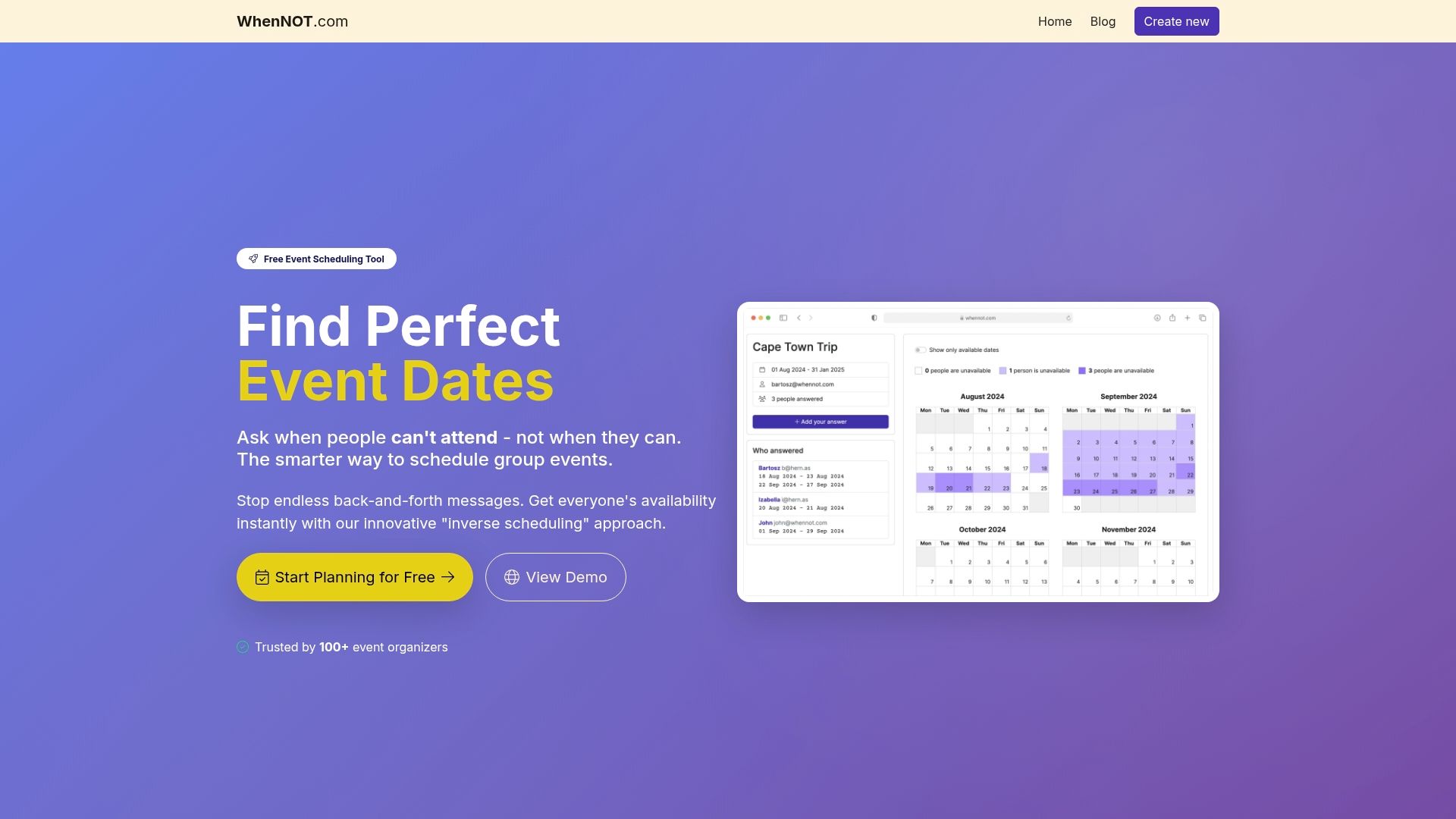
Experience how WhenNOT transforms your retreat planning by asking participants only when they are NOT available, saving precious time and boosting response rates. Create your event with a flexible date range, share a simple, shareable link, and get instant, visual insights that reveal the best dates for your team. No sign-ups or complicated platforms needed. Get started today and enjoy stress-free planning for your next corporate retreat or group event. Explore all the benefits by visiting WhenNOT and learn more about how inverse scheduling drives efficiency in group event planning and collect participant availability online. Take control of your schedule and finalize your retreat dates faster than ever before.
Frequently Asked Questions
What are the key dates I need to identify before sending invites for a group retreat?
To successfully plan a group retreat, you should determine registration deadlines, final headcount confirmations, and detailed itinerary distribution dates. Establish these dates early to streamline planning and enhance attendance by allowing participants to manage their schedules effectively.
How can I use inverse scheduling to improve the planning process?
Using inverse scheduling allows you to ask participants when they are not available, which simplifies the process and speeds up responses. Send a proposed date range and ask attendees to mark their conflicts, enabling you to identify optimal dates within just a few days.
How can I create an effective event poll for participant availability?
Create a simple, shareable link to collect availability from all participants without requiring sign-ups or complicated forms. This approach increases response rates dramatically, allowing you to gather responses efficiently and make planning decisions faster.
What are the benefits of visualizing participant availability during planning?
Visualizing participant availability helps you quickly assess conflicts at a glance, making it easier to shortlist optimal dates for the retreat. Use color-coded calendars or timelines to identify clear availability and potential conflicts in seconds, streamlining your decision-making process.
How can automated reminders help improve response rates from participants?
Automated reminders send timely notifications to participants about availability requests, significantly boosting response rates. Set up a system that sends reminders at strategic intervals, such as a few days after the initial request and again before the deadline, to keep planning on track and minimize delays.
Why is centralized communication important for planning a group retreat?
Centralized communication creates a single hub for all retreat planning updates, reducing confusion and the potential for conflicting information. Designate a primary platform for all communication to ensure everyone is informed simultaneously and can easily access essential details without searching through multiple channels.