
Nearly 45 percent of group organizers say scheduling events is their biggest headache. Whether you are planning a family reunion, a company retreat, or a remote team meeting, finding a time when everyone is available often feels impossible. Smart scheduling tools now offer creative solutions that cut through confusion and save you hours. From visual polls to instant booking links, this guide reveals how the top group scheduling apps can make your next event feel effortless.
Table of Contents
- 1. WhenNOT: Streamlining Events With Inverse Scheduling
- 2. Doodle: Poll-Based Group Scheduling Made Simple
- 3. Google Calendar: Easy Calendar Sharing And Coordination
- 4. When2meet: Visual Voting For Group Availability
- 5. Calendly: Automate Meeting Scheduling And Reminders
- 6. Microsoft Outlook: Integrated Scheduling For Teams
- 7. Timebridge: Coordinating Group Meetings With Ease
Quick Summary
| Takeaway | Explanation |
|---|---|
| 1. WhenNOT focuses on unavailability | This innovative tool asks users when they cannot attend, simplifying event coordination significantly. |
| 2. Doodle centralizes scheduling polls | Users can create polls for participants to indicate availability, eliminating complex exchanges and enhancing efficiency. |
| 3. Google Calendar enhances collaborative planning | With features like calendar sharing and real-time updates, it provides a comprehensive tool for group scheduling. |
| 4. When2meet offers visual scheduling | The color-coded grid allows users to effortlessly view overlapping availabilities, facilitating easier decision-making. |
| 5. Calendly automates scheduling tasks | By integrating with personal calendars, it removes the need for back-and-forth emails, streamlining the booking process. |
1. WhenNOT: Streamlining Events with Inverse Scheduling
Traditional scheduling apps often create more confusion than clarity. Enter WhenNOT, a revolutionary approach that flips the scheduling script by asking participants what times they cannot attend instead of when they are available.
The platform transforms group event planning by utilizing an innovative "inverse scheduling" method. Instead of the tedious back-and-forth of finding mutual availability, participants simply mark their unavailable dates. This approach dramatically simplifies coordination for multi-day events like family gatherings, corporate retreats, or group vacations.
As research from Arxiv suggests, adaptive scheduling tools are designed to reduce cognitive load and improve decision making efficiency. WhenNOT takes this concept further by allowing groups to quickly identify optimal meeting times without complex negotiations.
Here's how it works:
- Create an event with a potential date range
- Share a unique link with participants
- Participants mark dates they cannot attend
- The platform visualizes everyone's busy days simultaneously
The beauty of this approach lies in its simplicity. No account creation is required, making it accessible for everyone from family planners to corporate coordinators. By focusing on unavailability, WhenNOT cuts through scheduling complexity and helps groups find their perfect meeting window faster and with less stress.
2. Doodle: Poll-Based Group Scheduling Made Simple
When coordinating events with multiple people, finding a time that works for everyone can feel like solving a complex puzzle. Doodle simplifies this challenge through an intuitive poll-based scheduling approach that transforms group coordination.
The platform allows you to create a scheduling poll where participants can indicate their available time slots. Unlike traditional scheduling methods that require endless email threads or group chats, Doodle centralizes the entire process into a single interactive interface.
With group scheduling strategies becoming increasingly important, Doodle offers a straightforward solution for various scenarios:
- Professional team meetings
- Family reunions
- Social event planning
- Academic group projects
- Volunteer organization coordination
Users can quickly generate a poll by selecting potential dates and times. Participants receive a unique link they can click to mark their availability without needing to create an account. The platform then automatically highlights the most convenient time slots that work for the maximum number of people.
Whether you are managing a small team or organizing a large community event, Doodle removes the guesswork from scheduling. Its user friendly design ensures that even those who are not tech savvy can navigate the platform with ease and efficiency.
3. Google Calendar: Easy Calendar Sharing and Coordination
In the world of digital scheduling, Google Calendar stands out as a powerhouse tool for seamless group coordination. This free platform transforms how teams, families, and friends manage their time and plan events together.
As highlighted by University of Michigan research, Google Calendar's 'Find a time' feature revolutionizes meeting scheduling by allowing users to share calendars and instantly identify mutually available time slots.
Key features that make Google Calendar exceptional include:
- Instant calendar sharing with granular permission settings
- Real time updates and synchronization across devices
- Ability to create multiple calendars for different purposes
- Integration with other Google productivity tools
- Simple color coding for visual event organization
The platform goes beyond basic scheduling by enabling users to invite participants directly from the app, track responses, and automatically generate video conference links for virtual meetings. Whether you are coordinating a professional team project or planning a family gathering, Google Calendar provides a robust yet user friendly solution that adapts to your specific coordination needs.
For those seeking to optimize their scheduling workflow, understanding how to leverage Google Calendar's collaborative features can significantly streamline group planning and reduce communication overhead.
4. When2meet: Visual Voting for Group Availability
Scheduling group events often feels like solving a complex puzzle. When2meet transforms this challenging process into a simple, visually intuitive experience that helps teams and friends find their perfect meeting time with minimal effort.
Unlike traditional scheduling tools that require extensive back and forth communication, When2meet offers a color coded grid where participants can quickly mark their availability. The platform immediately highlights overlapping time slots, making it easy to identify the most convenient windows for everyone involved.
Key advantages of When2meet include:
- Instant visual representation of group availability
- No account creation required
- Simple drag and drop interface
- Supports multiple time zones
- Free to use for basic scheduling needs
The platform works especially well for groups with complex schedules like student teams, remote work teams, or international collaborators. By streamlining group availability, When2meet removes the typical friction associated with coordinating multiple calendars.
Users can create a poll in minutes, share a link with participants, and watch as the availability map fills in with color coded blocks representing individual schedules. This approach turns scheduling from a frustrating negotiation into an efficient, transparent process that respects everyone's time and commitments.
5. Calendly: Automate Meeting Scheduling and Reminders
Time is precious and scheduling meetings can feel like a never ending game of email ping pong. Calendly emerges as a game changing solution that automates the entire meeting scheduling process with remarkable simplicity and efficiency.
By connecting directly to your personal calendar, Calendly eliminates the back and forth communication typically required to find a mutually convenient meeting time. The platform allows you to set your available time slots and share a personalized scheduling link that lets others book meetings without endless email exchanges.
Powerful features that make Calendly exceptional include:
- Automatic time zone detection
- Buffer times between meetings
- Integration with video conferencing platforms
- Customizable availability rules
- Automatic email and calendar invite generation
For professionals across various industries who want to understand automated scheduling strategies, Calendly represents a significant leap forward in productivity. Whether you are a freelancer managing client meetings, a sales professional coordinating demos, or an academic scheduling student consultations, the platform adapts to diverse scheduling needs.
The true magic of Calendly lies in its ability to respect your time while providing a seamless booking experience for others. By setting clear boundaries and automating administrative tasks, you reclaim precious hours that would otherwise be lost to scheduling logistics.
6. Microsoft Outlook: Integrated Scheduling for Teams
For organizations deeply embedded in the Microsoft ecosystem, Outlook offers a powerful scheduling solution that goes far beyond basic email management. This comprehensive platform transforms team coordination by seamlessly integrating calendar management with communication tools.
Outlook's scheduling capabilities allow teams to view collective availability, propose meeting times, and send invitations with unprecedented ease. The platform understands the complex dynamics of professional scheduling and provides robust features that adapt to diverse workplace needs.
Standout features for team scheduling include:
- Shared calendar views for entire departments
- Automatic conflict detection
- Room and resource booking capabilities
- Cross platform synchronization
- Smart meeting suggestion algorithms
By mastering team scheduling best practices, organizations can leverage Outlook to reduce administrative overhead and improve overall communication efficiency. The tool becomes particularly powerful when integrated with Microsoft Teams, creating a unified workspace where scheduling and collaboration converge.
Whether you are managing a small team or coordinating across multiple departments, Outlook provides a familiar and intuitive interface that minimizes learning curves while maximizing scheduling productivity. Its deep integration with other Microsoft productivity tools makes it an essential scheduling companion for professionals worldwide.
7. Timebridge: Coordinating Group Meetings with Ease
Scheduling meetings across multiple participants can feel like solving a complex puzzle. Timebridge arrives as an elegant solution that transforms group coordination from a frustrating experience into a streamlined process.
The platform specializes in simplifying the intricate dance of finding mutually convenient meeting times. By providing an intelligent interface that considers individual schedules and preferences, Timebridge eliminates the endless email threads and communication delays typical of traditional scheduling methods.
Remarkable features that set Timebridge apart include:
- Intelligent time slot suggestions
- Cross platform calendar integration
- Automated meeting invitation workflows
- Customizable scheduling preferences
- Time zone accommodation for distributed teams
For organizations and groups seeking to understand the nuances of group scheduling, Timebridge offers a user friendly approach that respects individual schedules while promoting collective efficiency. The platform becomes particularly valuable for remote teams, consultants, and collaborative professionals who need precise scheduling without administrative overhead.
Whether you are coordinating a small team project or managing complex multi participant events, Timebridge provides the flexibility and intelligence needed to turn scheduling from a challenge into a seamless experience. Its intuitive design ensures that finding the right meeting time becomes less of a negotiation and more of a collaborative effort.
Below is a comprehensive table summarizing different scheduling tools and their key features discussed throughout the article.
| Tool | Approach | Key Features | Best For |
|---|---|---|---|
| WhenNOT | Inverse scheduling | No account needed, mark unavailability | Multi-day events, family gatherings |
| Doodle | Poll-based scheduling | Centralized polls, no endless emails | Social events, professional meetings |
| Google Calendar | Calendar sharing and coordination | 'Find a time', integration with Google tools | Teams, families, collaborative planning |
| When2meet | Visual voting | Color-coded grid, easy availability representation | Groups with complex schedules |
| Calendly | Automated scheduling | Time zone detection, customizable availability | Professionals managing meetings efficiently |
| Microsoft Outlook | Integrated scheduling | Shared calendar views, automatic conflict detection | Organizations using Microsoft tools |
| Timebridge | Intelligent coordination | Smart time suggestions, cross platform integration | Remote teams, consultants, collaborative projects |
Simplify Group Scheduling with WhenNOT’s Unique Approach
The article highlights common struggles with coordinating group events and finding the perfect meeting time that works for everyone. When dealing with multiple participants, conflicting schedules often cause frustration, endless back-and-forth, and wasted time. If your goal is to avoid these scheduling headaches and quickly identify the best options without confusion, then understanding the concept of "inverse scheduling" introduced by WhenNOT could be the game changer you need.
WhenNOT asks a simple but powerful question: When are you NOT available? This method transforms complicated group planning into a straightforward process that respects everyone’s true commitments. You can create an event, share a link, and have participants mark their unavailable dates without hassle or signing up. This lets you instantly visualize all busy days and pinpoint the ideal time that works for your whole group effortlessly.
Looking for a fast, private, and free scheduling solution that fits perfectly with the group event challenges described? Check out WhenNOT's innovative tool today.
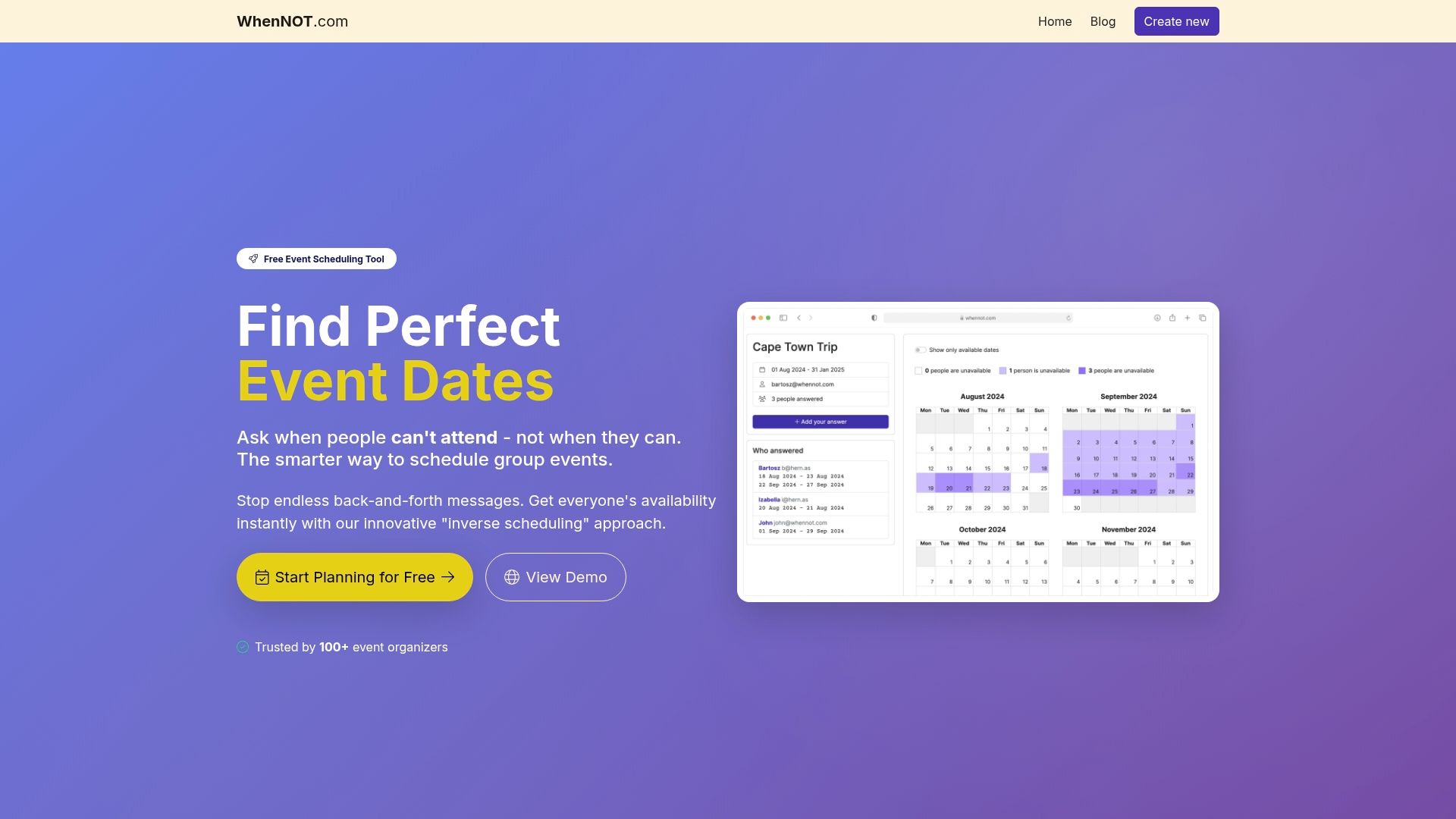
Take control of your group planning now with WhenNOT’s inverse scheduling method and experience how much time and stress you can save. Visit WhenNOT to start your event and explore more on how to streamline group availability with ease at Streamline Group Availability. Don’t let scheduling doubts slow you down—find your optimal event dates faster by joining thousands who trust WhenNOT for hassle free coordination.
Frequently Asked Questions
How does WhenNOT simplify group scheduling?
WhenNOT simplifies group scheduling by allowing participants to indicate what times they cannot attend instead of trying to find common availability. To use it, create an event, share the unique link, and have everyone mark their unavailable times, narrowing down the best options quickly.
What are the key features of Doodle for poll-based scheduling?
Doodle allows users to create a scheduling poll where participants can mark their available time slots, managing coordination efficiently. Start by selecting potential dates, share the poll link, and easily see which time slots work best for the group.
How can Google Calendar enhance team coordination?
Google Calendar enhances team coordination by enabling users to share calendars, allowing everyone to instantly find mutually available times. To optimize your scheduling, share your calendar with team members and utilize the 'Find a time' feature during planning discussions.
What makes When2meet effective for scheduling across busy schedules?
When2meet provides a visual color-coded grid for participants to mark their availability, making it easy to identify overlapping free time. To get started, create a poll, share the link, and watch as everyone’s availability fills in, helping you find the optimal meeting times easily.
How does Calendly automate meeting scheduling?
Calendly automates meeting scheduling by connecting to your personal calendar and allowing others to book appointments based on your predefined availability. Set your availability preferences, share your scheduling link, and reduce back-and-forth emails, streamlining the appointment booking process.
What advantages does Microsoft Outlook offer for team scheduling?
Microsoft Outlook offers shared calendar views, automatic conflict detection, and seamless integration with communication tools, making it ideal for teams. To utilize its capabilities, share your calendar with your team members and explore the automatic meeting suggestions generated by the platform.