
Group scheduling often turns into a frustrating scramble when even a simple plan gets lost among conflicting calendars. With over 60 percent of professionals citing time coordination as their top event planning headache, finding the right tool can change everything. The latest scheduling platforms break through the clutter by transforming how teams, families, and businesses align their availability—saving you time and sparing you the endless emails.
Table of Contents
- 1. WhenNOT: Streamlining Group Event Planning
- 2. Doodle: Traditional Availability Polling for Groups
- 3. Google Calendar: Scheduling with Seamless Integration
- 4. Microsoft Outlook: Scheduling for Professional Teams
- 5. Calendly: Automating Appointment Bookings
- 6. Teamup: Organizing Shared Calendars for Groups
- 7. SurveyMonkey: Using Surveys for Custom Schedule Polls
Quick Summary
| Takeaway | Explanation |
|---|---|
| 1. Use WhenNOT for simplified scheduling | This tool focuses on when participants cannot attend, reducing back-and-forth planning. |
| 2. Doodle works best for small groups | Ideal for finding availability among a few participants without complicated setups. |
| 3. Google Calendar integrates seamlessly with Google Workspace | Its features enhance scheduling efficiency through automatic time zone detection and easy sharing. |
| 4. Outlook is best for enterprise-level scheduling | It offers advanced tools for complex, professional scheduling needs within Microsoft ecosystems. |
| 5. SurveyMonkey allows custom schedule polls | Use this platform to create tailored surveys for capturing group availability efficiently. |
1. WhenNOT: Streamlining Group Event Planning
Planning group events can feel like solving a complex puzzle where everyone's schedules seem intentionally misaligned. Enter WhenNOT, an innovative scheduling tool that flips traditional event coordination on its head by focusing on when people cannot attend instead of when they can.
Traditional scheduling tools force participants to list their available times, creating endless back-and-forth communications. WhenNOT simplifies this process by asking participants to mark their unavailable dates. This "inverse scheduling" approach drastically reduces coordination complexity, especially for multi-day events like family reunions, corporate retreats, or group vacations.
Here's how WhenNOT works: Create an event, set a potential date range, and share a unique link with participants. Unlike other platforms, no account creation is required. Participants simply click the link and mark their busy dates. The platform then visualizes everyone's unavailable times, instantly revealing the optimal scheduling windows.
The tool offers several key benefits for group event planners:
- Zero Account Friction: Participants do not need to create accounts
- Privacy Focused: Only unavailable dates are shared
- Multi Day Friendly: Perfect for flexible date range events
- Free to Use: No cost for basic event coordination
How to streamline group availability becomes effortless with this approach. Whether you are organizing a family gathering or coordinating a team retreat, WhenNOT provides a straightforward solution to the age-old scheduling challenge.
2. Doodle: Traditional Availability Polling for Groups
When group scheduling feels like navigating a maze of conflicting calendars, Doodle emerges as a reliable solution for finding collective availability. As one of the most established online polling platforms, Doodle simplifies the process of coordinating meetings and events across multiple participants.
Doodle operates on a straightforward poll based approach. Event organizers create a poll with potential dates and times, then invite participants to mark their availability. The platform highlights the most convenient time slots that work for the majority of participants. Understanding group availability becomes significantly easier with this method.
The platform offers several key features that make group scheduling more efficient:
- Easy Poll Creation: Set up availability polls in minutes
- Multiple Participant Support: Invite numerous people simultaneously
- Visual Time Slot Comparison: Quickly see overlapping availability
- Email Integration: Send invitations directly through the platform
Practically speaking, Doodle works best for smaller groups planning meetings, team gatherings, or social events where finding a common time is critical. By removing the back and forth email chains and providing a centralized voting mechanism, Doodle transforms scheduling from a frustrating task into a streamlined process.
While Doodle represents a traditional scheduling method, it remains popular among professionals and casual users seeking a simple way to align group availability without complex software installations.
3. Google Calendar: Scheduling with Seamless Integration
For professionals seeking an integrated scheduling solution, Google Calendar stands out as a powerhouse of organizational efficiency. According to Inside A, the platform provides straightforward scheduling capabilities that seamlessly connect with Google Meet and other Google Workspace applications.
Google Calendar transforms scheduling from a complex task into an intuitive experience. Automatic time zone detection and smart invite management make coordinating meetings across different locations remarkably simple. Users can quickly share availability, send meeting invites, and track responses without leaving the platform.
Key features that make Google Calendar a top scheduling tool include:
- Direct Google Meet Integration: Launch video meetings instantly
- Multiple Calendar Support: Manage personal and professional schedules
- Shared Calendar Options: Collaborate with teams and family
- Mobile and Desktop Sync: Access schedules from anywhere
Understanding the role of scheduling tools becomes clearer with Google Calendar. Whether you are a remote worker coordinating international team meetings or a student managing academic deadlines, this tool adapts to diverse scheduling needs.
The platform goes beyond basic scheduling by offering smart suggestions, automatic conflict detection, and robust privacy controls. Its deep integration with other Google services makes it an attractive option for individuals and organizations already invested in the Google ecosystem.
4. Microsoft Outlook: Scheduling for Professional Teams
For organizations seeking robust scheduling solutions, Microsoft Outlook emerges as a powerful tool designed specifically for professional team coordination. According to Inside A, Outlook provides enterprise level scheduling capabilities that seamlessly integrate with Microsoft Teams and other Microsoft 365 applications.
Enterprise scheduling becomes remarkably streamlined with Outlook's comprehensive features. The platform allows teams to manage complex calendars, schedule meetings across different time zones, and track participant availability with remarkable precision. Its deep integration with Microsoft ecosystem makes it particularly attractive for businesses already using Microsoft productivity tools.
Key features that make Microsoft Outlook a top scheduling platform include:
- Automatic Meeting Proposals: Suggest times based on participant availability
- Room and Resource Booking: Reserve conference rooms and equipment
Master team scheduling best practices become easier when leveraging Outlook's advanced capabilities. The tool goes beyond simple scheduling by providing detailed meeting insights, allowing managers to track team productivity and communication patterns.
Outlook's scheduling capabilities shine in professional environments where coordination complexity is high. From multinational corporations to small businesses, the platform offers a comprehensive solution that balances detailed scheduling needs with user friendly design. Its ability to sync across desktop, mobile, and web platforms ensures that team members stay connected regardless of their location.
5. Calendly: Automating Appointment Bookings
In an era where time is the most precious commodity, Calendly revolutionizes how professionals schedule meetings by eliminating the endless back and forth of traditional appointment setting. Automated scheduling transforms the way individuals and businesses manage their time availability.
Calendly operates on a simple yet powerful principle: create your availability windows once, then let others book slots that work for you. By connecting with your existing calendar platforms, the tool prevents double bookings and ensures seamless time management. Professionals from consultants to sales representatives can customize their booking rules, set buffer times between meetings, and even create different meeting types with unique durations.
Key features that make Calendly a game changing scheduling platform include:
- Automatic Time Zone Detection: No more confusion about meeting times
- Integration with Multiple Calendars: Sync personal and professional schedules
- Custom Booking Pages: Personalize your scheduling experience
- Automated Confirmation and Reminder Emails: Reduce no show rates
Why use online scheduling tools becomes clear when you experience the efficiency of platforms like Calendly. The tool eliminates scheduling friction by providing a transparent, user friendly interface where invitees can see exactly when you are available and book accordingly.
From freelancers managing client consultations to HR teams coordinating interviews, Calendly offers a versatile solution that adapts to diverse professional needs. Its ability to integrate with video conferencing tools, payment platforms, and CRM systems makes it a comprehensive scheduling ecosystem for modern professionals.
6. Teamup: Organizing Shared Calendars for Groups
Navigating group scheduling can feel like solving a complex puzzle, but Teamup offers an elegant solution for teams seeking streamlined calendar management. According to SCM Galaxy, Teamup Calendar provides link-based access sharing that allows teams and nonprofits to organize shared calendars effectively.
Collaborative scheduling reaches new heights with Teamup's innovative approach. Unlike traditional calendar platforms, Teamup enables users to create multiple sub calendars within a single shared space. This means different team departments, projects, or groups can maintain distinct calendars while remaining interconnected and accessible.
Key features that make Teamup a powerful group scheduling tool include:
- Link Based Sharing: Easy calendar access without complicated permissions
- Custom Access Levels: Control what each team member can view or edit
- Mobile and Desktop Synchronization: Stay connected across devices
- Color Coded Calendars: Visual organization for complex schedules
Step by step team scheduling for group events becomes significantly easier with platforms like Teamup. The tool shines in scenarios where multiple stakeholders need visibility without compromising individual privacy or data control.
From nonprofit organizations coordinating volunteer schedules to small businesses managing project timelines, Teamup offers a versatile solution that adapts to diverse collaborative needs. Its intuitive interface and robust sharing capabilities make group scheduling feel less like a chore and more like a seamless team experience.
7. SurveyMonkey: Using Surveys for Custom Schedule Polls
Traditional scheduling often involves endless email threads and missed communications, but SurveyMonkey offers a refreshing alternative for coordinating group events. According to HubSpot Blog, the platform allows users to create scheduling polls that distribute availability requests via email or website embeds, complete with automatic reminders for non responders.
Flexible polling transforms group scheduling from a challenging task into a streamlined process. SurveyMonkey enables event organizers to design custom surveys that capture participant availability across multiple potential time slots, making it easier to identify optimal meeting windows without exhaustive back and forth communications.
Key features that make SurveyMonkey a powerful scheduling tool include:
- Customizable Polling Options: Design surveys tailored to your specific scheduling needs
- Automated Reminder Systems: Ensure high response rates
- Multiple Distribution Channels: Share polls via email or website
- Data Visualization: Clear graphical representation of participant availability
7 Effective Examples of Group Scheduling become more accessible with tools like SurveyMonkey. The platform excels in scenarios requiring complex group coordination such as academic project meetings, professional conferences, or large family gatherings.
Beyond simple scheduling, SurveyMonkey provides robust analytics that help organizers understand participant preferences and make informed decisions. Its flexibility and user friendly interface make it an excellent choice for those seeking a comprehensive approach to group event planning.
Below is a comprehensive table summarizing various scheduling tools discussed in the article.
| Tool | Features | Best For |
|---|---|---|
| WhenNOT | Inverse scheduling; no account creation needed; privacy focus | Multi-day events like family reunions |
| Doodle | Easy poll creation; visual time slot comparison | Smaller groups planning meetings |
| Google Calendar | Google Meet integration; multiple calendar support | Professionals needing seamless integration |
| Microsoft Outlook | Automatic meeting proposals; resource booking | Professional teams in enterprises |
| Calendly | Automatic time zone detection; custom booking pages | Individual professionals managing appointments |
| Teamup | Link-based sharing; color-coded calendars | Teams and nonprofits needing shared calendars |
| SurveyMonkey | Customizable polling; automated reminders | Complex group coordination for events |
Simplify Group Scheduling With WhenNOT
Scheduling tools like those covered in "7 Top Examples of Scheduling Tools and How to Use Them" reveal common challenges: endless back and forth messages, confusion about availability, and difficulty coordinating multi-day events. Many readers feel overwhelmed trying to find a time that works for everyone while protecting privacy and minimizing effort. WhenNOT directly addresses these pain points by asking participants when they are not available rather than when they are free. This simple shift reduces complexity and speeds up scheduling for flexible date ranges.
Using WhenNOT means no more tedious account sign-ups or confusing polls. Its privacy-focused design ensures only unavailable dates are shared. Whether you are organizing a family reunion or a corporate retreat, it turns group planning into an efficient, stress-free experience. Discover more about how to streamline group availability or learn about the role of scheduling tools to fully unlock the power of smart coordination.
Ready to cut through scheduling headaches and find the best dates effortlessly?
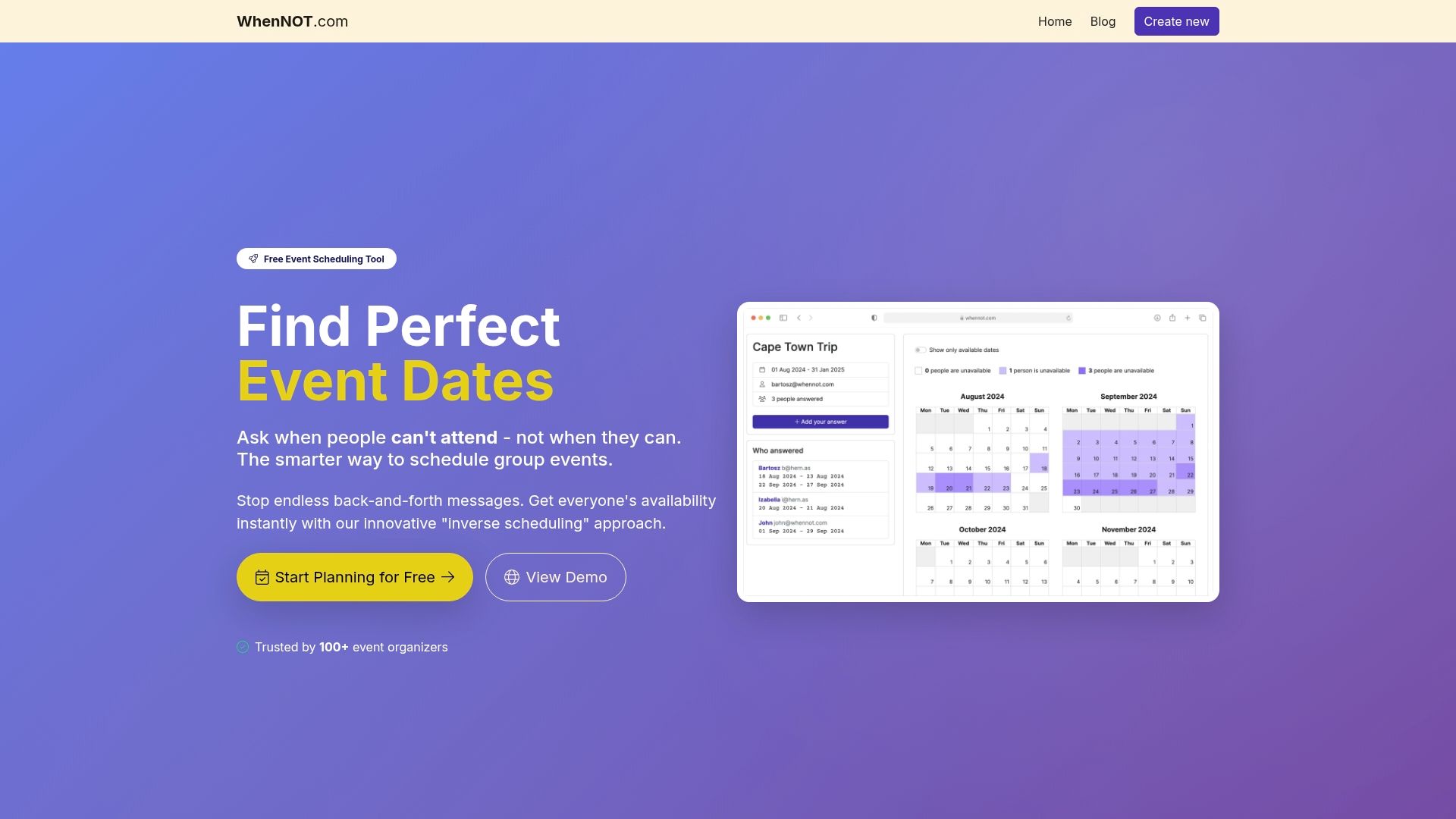
Try WhenNOT now for free at https://whennot.com and experience a straightforward, user-friendly way to plan group events with less hassle and more certainty.
Frequently Asked Questions
What are some examples of scheduling tools for group events?
When planning group events, tools like WhenNOT, Doodle, Google Calendar, Microsoft Outlook, Calendly, Teamup, and SurveyMonkey can streamline the scheduling process. These tools help you identify availability and coordinate times effectively.
How do I use WhenNOT for planning multi-day events?
To use WhenNOT, create an event, set a potential date range, and share the unique link with participants. Participants can easily mark the dates they are unavailable, helping you find the optimal scheduling windows.
What features make Doodle effective for smaller groups?
Doodle allows event organizers to create availability polls that participants can respond to, highlighting the best time slots for the majority. Set up a poll in minutes and send it out to multiple people simultaneously to quickly identify common availability.
How can I integrate Google Calendar with my existing schedules?
Google Calendar can sync with personal and professional calendars, allowing you to view all your appointments in one place. Start by connecting your existing calendars, and then use its shared calendar options to collaborate seamlessly with others.
What are the benefits of using Calendly for appointment scheduling?
Calendly automates the appointment booking process by allowing others to select available time slots you designate. Create your availability windows once, and prevent double bookings while eliminating back-and-forth communication.
How can SurveyMonkey enhance my group scheduling process?
SurveyMonkey enables you to create custom scheduling polls that capture participant availability effectively. Design tailored surveys to distribute via email or embed them on a website, ensuring high response rates with automated reminders.