
Coordinating a group event often feels like a puzzle with too many moving pieces. Schedules, deadlines, and communication gaps can quickly turn a simple plan into a major headache. But getting everyone on the same page does not have to be this complicated.
By using proven planning strategies, you can make group coordination smoother and more effective. Practical insights—like setting clear goals early and tapping into new scheduling tools—will help you avoid conflicts and keep everyone engaged. Get ready to discover actionable steps that take the guesswork out of scheduling and make your next group event easier to organize than ever before.
Table of Contents
- 1. Set Clear Event Goals And Date Ranges Early
- 2. Use Inverse Scheduling Tools For Quick Coordination
- 3. Share Scheduling Links For Easy Group Input
- 4. Visualize Participant Availability To Spot Conflicts Fast
- 5. Automate Reminders And Follow-Ups For Engagement
- 6. Prioritize Privacy And Accessibility For All Attendees
- 7. Review Scheduling Results Before Finalizing Dates
Quick Summary
| Key Insight | Explanation |
|---|---|
| 1. Set Clear Event Goals Early | Clearly defined goals streamline planning and align expectations among stakeholders, making the entire process more efficient. |
| 2. Use Inverse Scheduling Tools | These tools allow participants to share unavailable dates, simplifying coordination and reducing scheduling related communication. |
| 3. Share Scheduling Links | Centralized scheduling links enhance transparency and inclusivity, making it easier for participants to provide input on their availability. |
| 4. Visualize Participant Availability | Visual tools enable quick identification of scheduling conflicts and facilitate informed decisions about dates and times. |
| 5. Automate Reminders and Follow-Ups | Automation keeps participants engaged and informed, reducing no-show rates and improving overall communication effectiveness. |
1. Set Clear Event Goals and Date Ranges Early
Establishing clear event goals and defining flexible date ranges are fundamental first steps in efficient group event planning. The more precisely you articulate your event's purpose, the smoother your entire planning process becomes.
Researchers at the University of Waterloo highlight the critical importance of determining event objectives early in the planning stage. This approach allows organizers to:
- Align all stakeholder expectations
- Create targeted planning strategies
- Prevent potential scheduling conflicts
- Optimize participant availability
- Streamline resource allocation
When setting event goals, consider these key dimensions:
- Purpose: What specific outcomes do you want to achieve?
- Audience: Who are the primary participants?
- Desired Results: What tangible or intangible benefits should emerge?
Clarity in event objectives transforms scattered planning into a focused, strategic approach.
By establishing date ranges early, you create flexibility while maintaining structure. This means identifying potential timeframes that accommodate most participants' schedules and organizational constraints.
Practical tip: Start by polling key participants about their broad availability before committing to specific dates. This preliminary check can save significant rescheduling headaches later.
Pro tip: Use online scheduling tools that allow participants to mark their unavailable dates, making date selection more efficient and collaborative.
2. Use Inverse Scheduling Tools for Quick Coordination
Inverse scheduling represents a revolutionary approach to group event coordination that flips traditional scheduling methods on their head. Instead of asking participants when they are available researchers have discovered a more efficient way to manage complex scheduling challenges.
Research in critical event studies demonstrates how inverse scheduling tools can dramatically streamline group coordination processes. By allowing participants to mark their unavailable dates rather than their available times planners can quickly identify optimal meeting windows.
Key advantages of inverse scheduling include:
- Reduces scheduling communication cycles
- Minimizes back-and-forth email exchanges
- Provides instant visual clarity on group availability
- Accommodates participants across different time zones
- Simplifies complex multi-participant scheduling
The process works by:
- Setting a potential date range
- Inviting participants to mark unavailable periods
- Automatically generating the most compatible meeting times
- Selecting the optimal slot with minimal conflicts
Inverse scheduling transforms complicated coordination into a simple visual process.
According to academic conference planning resources, this method helps organizers work backward from fixed deadlines, creating more adaptable and efficient scheduling strategies.
Pro tip: Choose scheduling tools that offer visual overlays of participant availability to quickly identify the most convenient time slots for everyone involved.
3. Share Scheduling Links for Easy Group Input
In the digital age of event planning, sharing scheduling links has become a game-changing strategy for gathering group input quickly and efficiently. By creating a centralized link that participants can access instantly, you eliminate the endless email chains and communication bottlenecks.
Brown University's event strategy resources highlight how sharing scheduling links promotes transparency and inclusivity in group coordination. This approach transforms complex scheduling from a tedious task into a streamlined process.
Key benefits of using shared scheduling links include:
- Reduces communication overhead
- Prevents scheduling conflicts
- Enables real-time group input
- Provides instant visual availability tracking
- Works across multiple time zones
- Eliminates repetitive follow-up emails
The process of sharing scheduling links involves:
- Select a user-friendly scheduling platform
- Create a unique event link
- Distribute the link to all participants
- Collect and analyze group availability
- Finalize event timing based on collective input
A single shared link can replace hours of individual scheduling negotiations.
Quick implementation strategies focus on making the process as frictionless as possible for participants. This means choosing platforms that do not require account creation or complex sign-up processes.
Pro tip: Customize your scheduling link with a brief description and clear instructions to encourage maximum participant engagement and reduce confusion.
4. Visualize Participant Availability to Spot Conflicts Fast
Visualization transforms complex scheduling data into clear actionable insights. Seeing participant availability at a glance allows event planners to make rapid informed decisions about group coordination.
University of Waterloo research highlights the critical importance of visual availability tracking in event planning. These tools help planners instantly identify scheduling conflicts and optimize group participation.
Key benefits of visual availability mapping include:
- Eliminates manual scheduling guesswork
- Reduces communication time
- Highlights potential scheduling conflicts
- Provides instant group overview
- Supports cross-timezone coordination
- Enables quick rescheduling decisions
Effective visualization strategies involve:
- Choose tools with color-coded availability
- Use overlay calendars for multiple participants
- Set clear date range parameters
- Analyze gaps and overlaps systematically
- Prioritize times with maximum group attendance
Visual scheduling transforms complex coordination into a simple graphical process.
Strategic visualization means looking beyond just available times and understanding the broader participation landscape. This approach helps predict and prevent potential scheduling roadblocks before they become problems.
Pro tip: Select scheduling tools that offer real-time collaborative visualization features to enable instant group decision-making.
5. Automate Reminders and Follow-Ups for Engagement
In the complex world of event planning, automated reminders are the secret weapon for maintaining participant engagement and reducing last-minute dropouts. Technology now enables planners to stay connected with participants effortlessly without constant manual intervention.
Brown University recommends automated communication as a best practice for event management. Automated reminders ensure timely updates and consistent interaction across diverse participant groups.
Key advantages of automation include:
- Reduces manual communication workload
- Minimizes participant no-show rates
- Provides consistent messaging
- Supports real-time participant tracking
- Enhances overall event communication
- Improves participant experience
Effective automation strategies involve:
- Segment participant communication lists
- Create personalized reminder templates
- Set strategic reminder intervals
- Track and analyze participant responses
- Adjust communication based on engagement metrics
Automation transforms event communication from reactive to proactive.
Strategic reminder design means crafting messages that are informative yet not overwhelming. This requires understanding participant preferences and communication channels.
Pro tip: Test different reminder frequencies and messaging styles to discover the optimal communication approach for your specific event participants.
6. Prioritize Privacy and Accessibility for All Attendees
In the modern event planning landscape privacy and accessibility are not just nice-to-have features they are essential requirements. Ensuring every participant feels respected and can fully engage is the hallmark of exceptional event coordination.
University of Waterloo research highlights the critical importance of creating inclusive event experiences. By prioritizing privacy and accessibility planners can foster equitable participation across diverse participant groups.
Key strategies for inclusive event planning include:
- Protect participant personal information
- Accommodate diverse physical needs
- Provide multiple communication formats
- Ensure technology is user friendly
- Support linguistic diversity
- Offer flexible participation options
Effective accessibility approaches involve:
- Anonymize participant scheduling data
- Design multiple event participation pathways
- Offer translation and interpretation services
- Create adaptable digital interfaces
- Provide clear communication about accommodations
True inclusivity means removing barriers before they become obstacles.
Privacy-first event design requires understanding participant comfort levels and proactively addressing potential concerns about data usage and personal information.
Pro tip: Always provide clear opt-out mechanisms and transparent communication about how participant data will be collected processed and protected.
7. Review Scheduling Results Before Finalizing Dates
Event planning is a nuanced process where final details can make or break the entire experience. Reviewing scheduling results thoroughly before confirming dates is the critical last checkpoint that separates successful events from potential logistical nightmares.
Brown University's event planning guide emphasizes the importance of validating scheduling outcomes meticulously before committing to final dates. This final review ensures maximum participant engagement and minimal scheduling conflicts.
Key aspects of comprehensive scheduling review include:
- Analyze participant availability patterns
- Verify stakeholder consultation status
- Identify potential time zone conflicts
- Check for overlapping commitments
- Assess overall group participation rates
- Confirm venue and resource availability
Effective review processes involve:
- Generate comprehensive availability reports
- Cross-reference participant constraints
- Consult key stakeholders
- Validate data accuracy
- Make informed final date selections
A thorough review transforms scheduling from guesswork to strategic planning.
Strategic scheduling validation requires a holistic view that considers not just availability but also participant preferences and broader logistical contexts.
Pro tip: Create a final review checklist that includes cross-referencing participant data background constraints and potential alternative date options.
Below is a comprehensive table summarizing the key event planning strategies discussed throughout the article.
| Strategy | Overview | Implementation | Benefits |
|---|---|---|---|
| Set Clear Event Goals and Date Ranges Early | Define clear goals and flexible date ranges to streamline planning. | Identify purpose, audience, and desired outcome; create flexible schedules based on key participant input. | Aligns expectations, avoids conflicts, optimizes resources. |
| Use Inverse Scheduling Tools | Leverage tools to simplify scheduling by marking unavailable dates. | Poll participant unavailability; automate optimal date selection using visual interfaces. | Reduces communication cycles, simplifies coordination, accommodates time zones. |
| Share Scheduling Links | Use centralized scheduling links for group input. | Generate unique event links, distribute to participants, collect responses for decision making. | Minimizes communication overhead, enables real-time updates, enhances inclusivity. |
| Visualize Participant Availability | Display availability data for informed planning. | Utilize color-coded calendars, overlay group schedules, analyze patterns and gaps. | Eliminates guesswork, reduces conflicts, supports cross-time-zone coordination. |
| Automate Reminders and Follow-Ups | Implement automated communication for participant engagement. | Develop reminder templates, schedule regular updates, analyze response metrics for optimization. | Reduces dropouts, ensures engagement consistency, improves communication management. |
| Prioritize Privacy and Accessibility | Integrate features ensuring inclusivity and respect for participant data. | Offer multiple options for participation, anonymize data, provide clear opt-outs and accessible tools. | Promotes equitable participation and builds trust among attendees. |
| Review Scheduling Results | Validate all scheduling outputs before finalizing dates. | Analyze availability, cross-check constraints, consult stakeholders, and confirm logistics. | Ensures comprehensive planning, maximizes attendance, minimizes errors. |
Simplify Your Group Event Planning with WhenNOT
The article highlights key challenges like managing complicated schedules, spotting conflicts fast, and engaging participants without overwhelming them. If you want to save time and reduce endless back-and-forth communications, the inverse scheduling approach discussed here is a game changer. WhenNOT matches this concept perfectly by asking attendees when they are not busy instead of when they are free. This method helps you quickly find the best event dates with minimal effort.
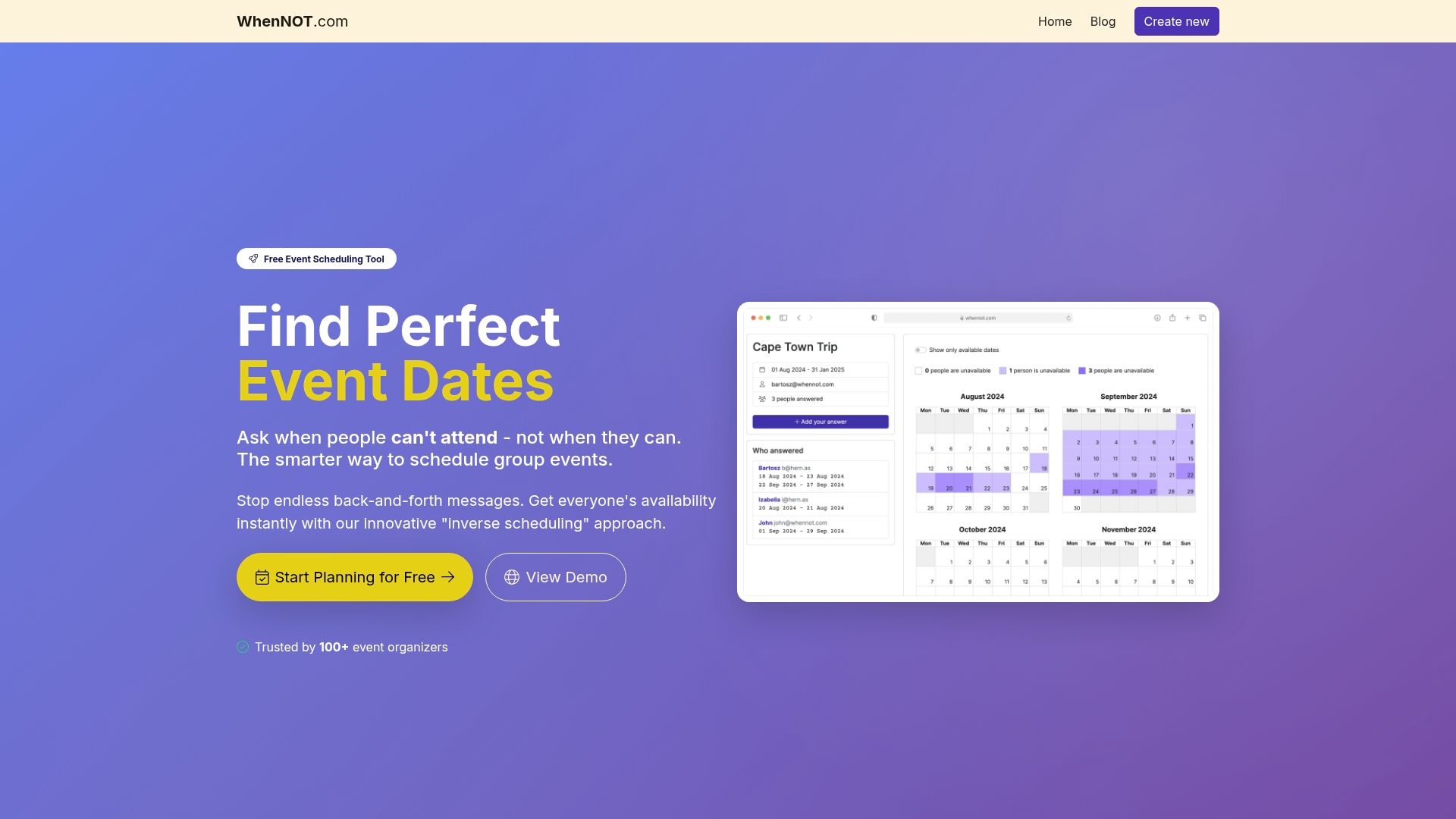
Experience firsthand how WhenNOT streamlines scheduling for any group event. You can create an event, share a unique link for participants to mark unavailable dates without signing up, and instantly see a visual overview of conflicts and availability. This lets you secure the ideal timing faster while prioritizing privacy and ease of use. Don’t let scheduling delays hold you back. Start planning smarter today at WhenNOT and discover the benefits of efficient, inclusive group coordination. Learn more on the landing page and explore how this innovative tool transforms your planning routine.
Frequently Asked Questions
How can I set clear goals for my group event?
Establish clear goals by defining the purpose, audience, and desired outcomes of the event. Outline these objectives early in the planning process, so planning strategies align with stakeholder expectations and participant availability.
What is inverse scheduling, and how does it help in planning?
Inverse scheduling allows participants to indicate when they are unavailable, making it easier to identify optimal meeting times. Implement this method by inviting participants to mark unavailable periods within a specified date range for a more efficient scheduling process.
How can I share a scheduling link effectively with participants?
Create a user-friendly scheduling link that centralizes group input and makes it easy for participants to indicate their availability. Distribute this link widely before finalizing dates, allowing for a smooth coordination experience without overwhelming email exchanges.
What are the benefits of visualizing participant availability?
Visualizing participant availability simplifies the process of identifying scheduling conflicts and enhancing group coordination. Use tools with color-coded availability and overlay calendars to quickly spot gaps, allowing you to make informed decisions about event timing.
How do I automate reminders for participants?
Automating reminders helps engage participants and reduces the likelihood of last-minute dropouts. Set up personalized reminder messages at strategic intervals to keep everyone informed and encourage consistent participation throughout the planning process.
What should I include in my final review of scheduling results?
In your final review, analyze participant availability patterns and confirm there are no overlapping commitments. Compile a comprehensive report of availability and verify stakeholder input to select the optimal date for your event.