
Over 60 percent of American event planners report that last-minute schedule changes are their biggest headache during multi-day corporate retreats. With so many moving parts and competing priorities, even a single miscommunication can derail the entire coordination process. This guide introduces proven solutions and practical tools designed to help American teams avoid scheduling conflicts, maximize efficiency, and create seamless event experiences from start to finish.
Table of Contents
- Understand Team Availability With Simple Tools
- Use Inverse Scheduling To Reduce Conflicts
- Streamline Communication With Clear Instructions
- Visualize Schedules For Faster Decision-Making
- Prioritize Privacy And Data Security For Attendees
- Opt For Accessible, No-Cost Platforms
- Evaluate And Adjust Your Coordination Process
Quick Summary
| Takeaway | Explanation |
|---|---|
| 1. Utilize Scheduling Tools | Use modern scheduling tools to get precise team availability, reducing manual coordination and errors. |
| 2. Implement Inverse Scheduling | Identify team members' unavailable times to simplify the coordination process and reduce conflicts. |
| 3. Streamline Communication Processes | Establish clear communication protocols and utilize centralized platforms to enhance team collaboration. |
| 4. Visualize Schedules for Clarity | Use visual scheduling techniques like Gantt charts to track project dynamics and make faster decisions. |
| 5. Prioritize Data Security | Implement strong security measures for attendee data to build trust and comply with privacy regulations. |
1. Understand Team Availability with Simple Tools
Effective event coordination starts with knowing exactly when your team members are and aren't available. Modern scheduling tools have transformed how planners manage complex team logistics and minimize communication gaps.
Utilizing simple scheduling platforms allows event planners to track team availability with unprecedented precision. These digital tools eliminate the traditional back and forth of emails and text messages, replacing them with intuitive interfaces that provide real time insights into team schedules.
Project management and scheduling platforms enable planners to centralize team availability data, allowing quick identification of potential meeting windows and potential scheduling conflicts. By creating a visual representation of team schedules, these tools help prevent overlapping commitments and streamline event planning processes.
Key benefits of using availability tracking tools include reducing manual coordination time, minimizing scheduling errors, and creating transparency across team members. Planners can quickly see who is free, who has potential conflicts, and strategically plan events around existing commitments.
When selecting an availability tracking tool, prioritize platforms that offer user friendly interfaces, real time updates, and seamless integration with existing calendars. Look for solutions that allow team members to input their availability without complex sign up processes.
Pro tip: Always test your chosen scheduling tool with a small team project before deploying it for large scale event coordination to ensure smooth adoption and identify potential workflow challenges.
2. Use Inverse Scheduling to Reduce Conflicts
Inverse scheduling represents a revolutionary approach to event planning that flips traditional scheduling methods on their head. Instead of asking participants when they are available, this technique focuses on identifying when team members are unavailable.
By eliminating scheduling conflicts, inverse scheduling allows event planners to streamline the coordination process dramatically. This method reduces the endless back and forth communication that typically accompanies traditional scheduling approaches.
The core principle of inverse scheduling involves gathering information about participants unavailable time slots rather than their free moments. This approach simplifies the scheduling process by quickly identifying potential meeting windows without requiring multiple rounds of communication.
Technology driven scheduling systems have made inverse scheduling more accessible than ever. Automated tools can now track team availability, generate optimal meeting times, and provide real time updates that minimize scheduling complications.
Implementing inverse scheduling requires clear communication and the right technological support. Event planners should introduce the concept to team members, demonstrate the tool's simplicity, and highlight how it saves collective time and reduces administrative overhead.
Pro tip: Select an inverse scheduling platform that allows participants to input unavailable times quickly and anonymously to encourage honest and comprehensive schedule sharing.
3. Streamline Communication with Clear Instructions
Successful event coordination hinges on crystal clear communication that leaves no room for misunderstanding. Effective communication transforms complex event planning into a smooth collaborative process.
Event planners can optimize team coordination strategies by establishing precise communication protocols from the start. This means creating a structured approach that defines expectations, responsibilities, and communication channels for every team member.
Centralized communication platforms play a critical role in streamlining information flow. Tools like Slack, Microsoft Teams, and project management software enable real time updates, document sharing, and instant feedback. These platforms create a single source of truth where team members can access current information and track project progress.
Documenting instructions requires extreme clarity. Break down complex tasks into specific actionable steps, use visual aids when possible, and encourage team members to ask clarifying questions. Provide context around each task to help team members understand not just what needs to be done, but why it matters.
Establish regular check in meetings to review progress, address potential roadblocks, and ensure everyone remains aligned with the event goals. These meetings should be structured, time efficient, and focused on actionable insights rather than general discussions.
Pro tip: Create a detailed communication matrix that outlines who communicates what, when, and through which channel to eliminate potential information gaps and reduce miscommunication risks.
4. Visualize Schedules for Faster Decision-Making
Visual scheduling transforms complex event planning from a chaotic process into a clear strategic roadmap. By transforming abstract timelines into graphic representations, event planners can instantly grasp project dynamics and make informed decisions.
Gantt charts and interactive timeline tools offer powerful scheduling visualization methods that help planners track task dependencies, deadlines, and resource allocation. These visual platforms enable quick comprehension of project flow and potential bottlenecks.
Interactive scheduling maps allow real time updates and collaborative viewing. Team members can see precise task ownership, estimated completion times, and potential scheduling conflicts at a single glance. This transparency reduces communication gaps and accelerates overall project momentum.
Modern visualization tools go beyond simple timelines. Advanced platforms integrate venue layouts, workforce placement, and infrastructure planning into comprehensive visual dashboards. These integrated views help planners anticipate challenges, optimize resource distribution, and make rapid strategic adjustments.
When selecting a visual scheduling tool, prioritize platforms with intuitive interfaces, real time collaboration features, and customizable views. Look for solutions that allow drag and drop task management and provide clear visual indicators of project progress and potential risks.
Pro tip: Choose a visualization tool that allows color coding and layered views to help your team quickly distinguish between different types of tasks and their current status.
5. Prioritize Privacy and Data Security for Attendees
Data privacy is no longer an optional consideration for event planners but a critical requirement that directly impacts attendee trust and organizational reputation. Protecting participant information has become a fundamental responsibility in the digital event planning landscape.
Event organizers must implement robust security measures to safeguard attendee data, focusing on comprehensive privacy protection strategies. This means understanding and adhering to key regulations like General Data Protection Regulation and California Consumer Privacy Act.
Securing registration and payment channels requires multiple layers of protection. Implement end to end encryption for all data transmission, limit access to sensitive information based on specific user roles, and ensure that only necessary personal details are collected during the registration process.
Transparency is crucial when handling attendee data. Develop clear consent mechanisms that explicitly explain how participant information will be used, stored, and protected. Provide straightforward opt out options and give attendees control over their personal information.
Create a comprehensive data breach response plan that outlines immediate actions to be taken in case of potential security incidents. Train your entire event planning team on cybersecurity best practices and establish strict protocols for data handling and protection.
Pro tip: Conduct regular security audits of your event registration platforms and update your data protection policies at least annually to stay ahead of emerging cybersecurity threats.
6. Opt for Accessible, No-Cost Platforms
Event planners are increasingly turning to free digital platforms that eliminate financial barriers and simplify coordination processes. Modern technology has democratized event planning by offering robust tools without expensive subscriptions or complex installations.
Accessible platforms like cloud-based event management tools provide comprehensive solutions without requiring upfront investments. These platforms enable planners to manage events efficiently across multiple devices using simple internet connections.
When selecting a no-cost platform, prioritize solutions that offer core functionalities without hidden fees. Look for tools that support critical event planning tasks such as participant scheduling, venue mapping, team collaboration, and communication tracking.
Key advantages of free platforms include zero financial risk, immediate implementation, and seamless scalability. Event planners can experiment with different tools, test features, and upgrade only when specific advanced capabilities become necessary for their unique project requirements.
Remember that free does not mean limited. Many contemporary platforms provide sophisticated features like real time updates, collaborative editing, and integration capabilities that rival expensive enterprise solutions.
Pro tip: Always review the platform's data privacy policies and export options before committing to ensure you can migrate your event information if needed.
7. Evaluate and Adjust Your Coordination Process
Successful event planning is an iterative process that requires continuous learning and strategic refinement. The most effective event coordinators view each event as an opportunity to improve their future performance.
Implementing a structured group event coordination process allows planners to systematically analyze their strategies and identify areas for improvement. This approach transforms past experiences into valuable learning opportunities.
A comprehensive evaluation begins with establishing clear success metrics before the event. These metrics should encompass both quantitative measurements like attendance rates and qualitative feedback such as participant satisfaction levels. By defining specific goals in advance, planners create a framework for meaningful assessment.
Post event analysis involves collecting detailed feedback from multiple stakeholders including attendees, vendors, team members, and sponsors. Utilize surveys, interviews, and analytical tools to gather comprehensive insights about what worked well and what could be enhanced in future events.
Effective evaluation goes beyond simply collecting data. The real value emerges when planners translate these insights into actionable strategies. Look for recurring patterns in feedback, identify systemic challenges, and develop targeted solutions to address potential bottlenecks in your coordination process.
Pro tip: Create a standardized post event evaluation template that can be quickly adapted for different event types, ensuring consistent and comparable feedback across multiple events.
Below is a comprehensive table summarizing the key strategies and practices for effective event planning as discussed in the article.
| Strategy | Description | Benefits |
|---|---|---|
| Understand Team Availability | Implement tools to track team members' availability efficiently. | Reduces manual coordination time, minimizes errors, and increases transparency. |
| Use Inverse Scheduling | Focus on unavailable periods of participants to schedule activities. | Streamlines scheduling processes and avoids conflicts. |
| Streamline Communication | Maintain clear instructions and utilize centralized communication platforms. | Enhances coordination and prevents misunderstandings. |
| Visualize Schedules | Utilize visual tools like Gantt charts to represent schedules comprehensively. | Simplifies planning and facilitates faster decision-making. |
| Prioritize Privacy | Protect participant data through robust privacy measures. | Builds trust and ensures compliance with privacy regulations. |
| Opt for No-Cost Platforms | Employ accessible platforms that offer essential functionalities without costs. | Enables effective planning without upfront investments. |
| Evaluate and Adjust | Continuously refine the planning process by analyzing past event performance. | Improves future outcomes through targeted optimizations. |
Simplify Your Event Coordination with WhenNOT
Event planners often struggle with scheduling conflicts, fragmented communication, and the tedious back and forth of gathering availability. This article highlights how techniques like inverse scheduling and clear visualization can transform event planning by saving time and reducing errors. If you want to tackle these exact challenges, WhenNOT offers a seamless solution that asks participants only when they are unavailable. This unique approach eliminates confusion, accelerates decision-making, and ensures greater privacy and ease for everyone involved.
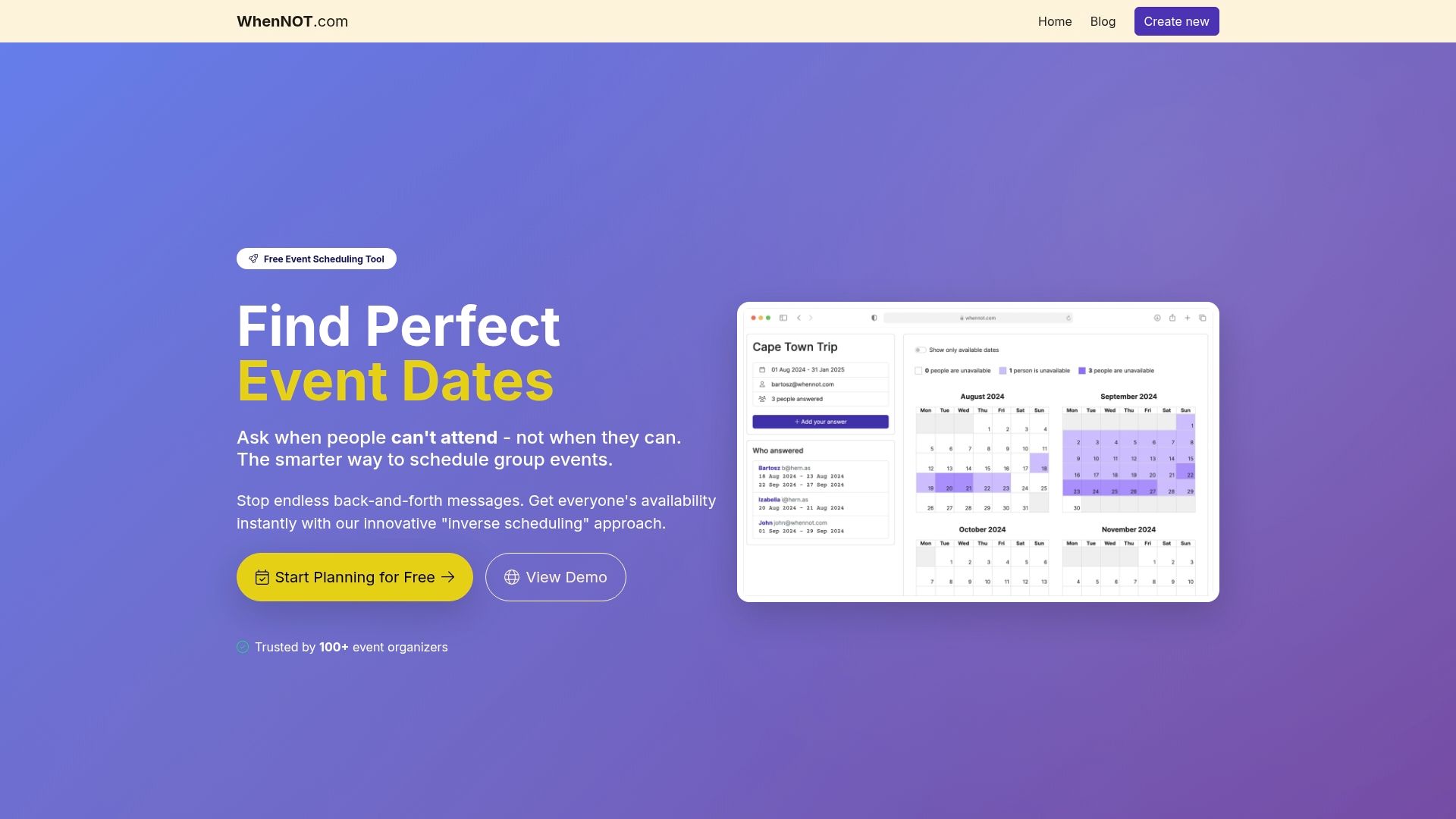
Experience the power of effortless event coordination by trying WhenNOT today. Join thousands of planners who have cut down scheduling headaches and improved team communication with this innovative, no-cost online scheduling tool. Visit WhenNOT now to start visualizing your team’s true availability and coordinating your next event with confidence.
Frequently Asked Questions
How can I understand my team's availability better for event planning?
To improve your understanding of team availability, utilize simple scheduling tools that track schedules in real time. Start by selecting a user-friendly platform to visualize team members' commitments and identify potential meeting windows.
What is inverse scheduling, and how can it help reduce conflicts?
Inverse scheduling focuses on identifying when team members are unavailable rather than when they are free. Adopt this approach by gathering unavailable time slots from participants, which simplifies scheduling and minimizes back-and-forth communication.
How should I communicate tasks and expectations to my event planning team?
Establish clear communication protocols to outline expectations, responsibilities, and communication channels. Create a detailed communication matrix that specifies who communicates what, when, and through which channel to ensure everyone is aligned and informed.
What are the benefits of visualizing schedules during event coordination?
Visualizing schedules through tools like Gantt charts allows for a clear understanding of task dynamics and project flow. Implement visual scheduling methods to quickly identify dependencies and potential bottlenecks, enabling faster decision-making during the planning process.
How can I ensure data privacy and security for my event attendees?
Prioritize data privacy by implementing robust security measures, such as end-to-end encryption and clear consent mechanisms for data use. Develop a data breach response plan and train your team on best practices to protect attendee information effectively.
What are the advantages of using no-cost platforms for event planning?
No-cost platforms eliminate financial barriers by providing essential event planning tools without upfront costs. Explore available free options to manage scheduling, collaboration, and communication efficiently while allowing room for future upgrades as needed.
Recommended
- 7 Habits of Successful Event Organizers You Should Adopt - WhenNOT Blog
- Group Event Coordination Process: Streamlining Planning for Busy Schedules - WhenNOT Blog
- Efficient Event Coordination: Step-by-Step Guide for Success - WhenNOT Blog
- Ultimate Event Planning Checklist for Successful Gatherings - WhenNOT Blog